
Site access & muster
Only ready people through the gate. Everyone on the roll call.
Site access in Assured Contractors is a gate mode that checks each arrival's company status, qualification cards and site assignment in seconds, records the decision with its reasons, keeps a live list of who's on site and runs the emergency muster roll call from that list.
Gate staff search for the person, see whether they're ready and why, and check them in or refuse them with a reason. The same list drives live attendance and the muster, so a roll call starts from who is actually on site.
- Readiness check in seconds
- Decisions recorded with reasons
- Muster and drills from the live list
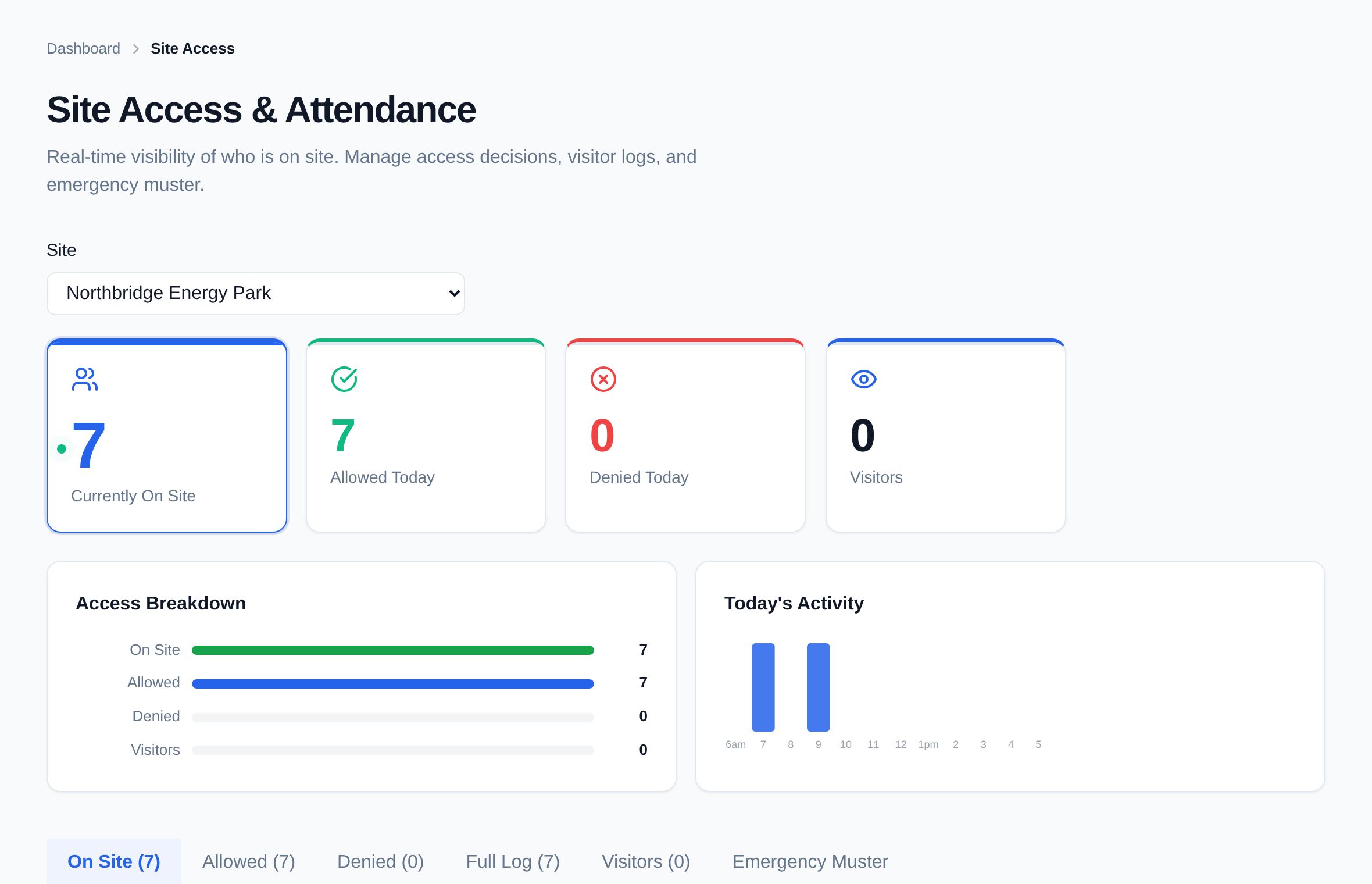
- Decisions with reasonsEvery check-in and refusal is recorded with who decided, when, at which site and why.
- A muster list that's trueWorkers checked in at the gate and visitors signed in at the kiosk are on the same list when the alarm goes.
- Gate staff who knowA gate/security role sees readiness and reasons — not the whole contractor file.
Stage 03 · Run the gate
What's included?
A readiness check at the gate, live attendance, and an emergency muster roll call from the same list.
Gate mode
Search by name and see the person's company, role and readiness for this site, with the reasons.
Check in or refuse
Check a ready worker in with one press, or refuse entry with a reason such as an expired card or missing PPE.
Let in anyway, on the record
If someone isn't ready and you let them in, a note is required — for example, escorted by the site manager.
Live attendance
Who's on site now, when they arrived, and who was allowed in or refused today.
Check-out
Check people out at the gate so the on-site list stays accurate through the day.
Emergency muster
Start a muster for a site and work through the roll call from the live list, marking people accounted for.
Drills, recorded
Run a drill the same way as a real muster. It's recorded as a drill, separately from real emergencies.
Visitors included
Visitors signed in at the site's kiosk appear in site access and on the muster list.
A role for the gate
Give gate and security staff the Gate/Security role: they run the gate without seeing everything else.
How it works
How does it work, step by step?
Search the arrival
Gate staff search by name on a tablet, phone or computer.
See readiness and reasons
Company status, cards in date and site assignment are checked live for this site.
Decide
Check them in, refuse with a reason, or let them in anyway with a recorded note.
Keep the list live
Check-outs and visitor sign-ins keep the on-site list current all day.
Muster when needed
Start an emergency muster or a drill and run the roll call from that list.
Gate mode
What gate staff see.
Each arrival is checked against their company, their cards and their assignment to this site. A ready worker goes straight in; anyone who isn't is referred, with the reason on screen.
- Reasons, not a red lightThe expired card or missing approval is named.
- Visitors on the same listKiosk sign-ins sit alongside workers for the muster.
An illustration with example names, not live data.
- Company assuredNorthfield Lifting · Ready
- Insurance in dateEL £10m · to 30 Jun
- CPCS A60 crane operator cardExpires Mar 2028
- Assigned to this siteRiverside · from 4 Nov
Does Assured Contractors connect to turnstiles or biometric readers?
No. Assured Contractors runs the gate on a tablet, phone or computer: gate staff search for the person and record the decision. It doesn't control turnstiles, read fingerprints or faces, or use other gate hardware.
What does the gate check?
Whether the person's company is approved, whether their qualification cards are in date for what the site needs, and whether they're assigned to this site. Anything that fails is shown with the reason.
Can gate staff let someone in who isn't ready?
Yes, but it's on the record: letting in someone who isn't ready needs a note, such as “escorted by the site manager”, and the decision is logged with who made it.
How does the muster work?
Start a muster for the site and the roll call opens with everyone checked in, plus visitors signed in at the kiosk. Mark each person accounted for, missing, needing assistance or evacuated. Drills work the same way and are recorded.
Does it work if the site loses signal?
Assured Contractors needs a data connection — there's no offline mode. Many sites keep a printed copy of the on-site list as a fallback.
Keep exploring
Works with
Modules that share this one's record — and where to read more.
Who uses it
Get every contractor site-ready.
Start a 14-day free trial — no card. Send your contractors your company code: they join free and keep one profile for every client they work for.